
Everything about one AI asset, on one page.
Open any component, tool server, finding or machine and see where it lives, who owns it, what it can reach and what to do about it.
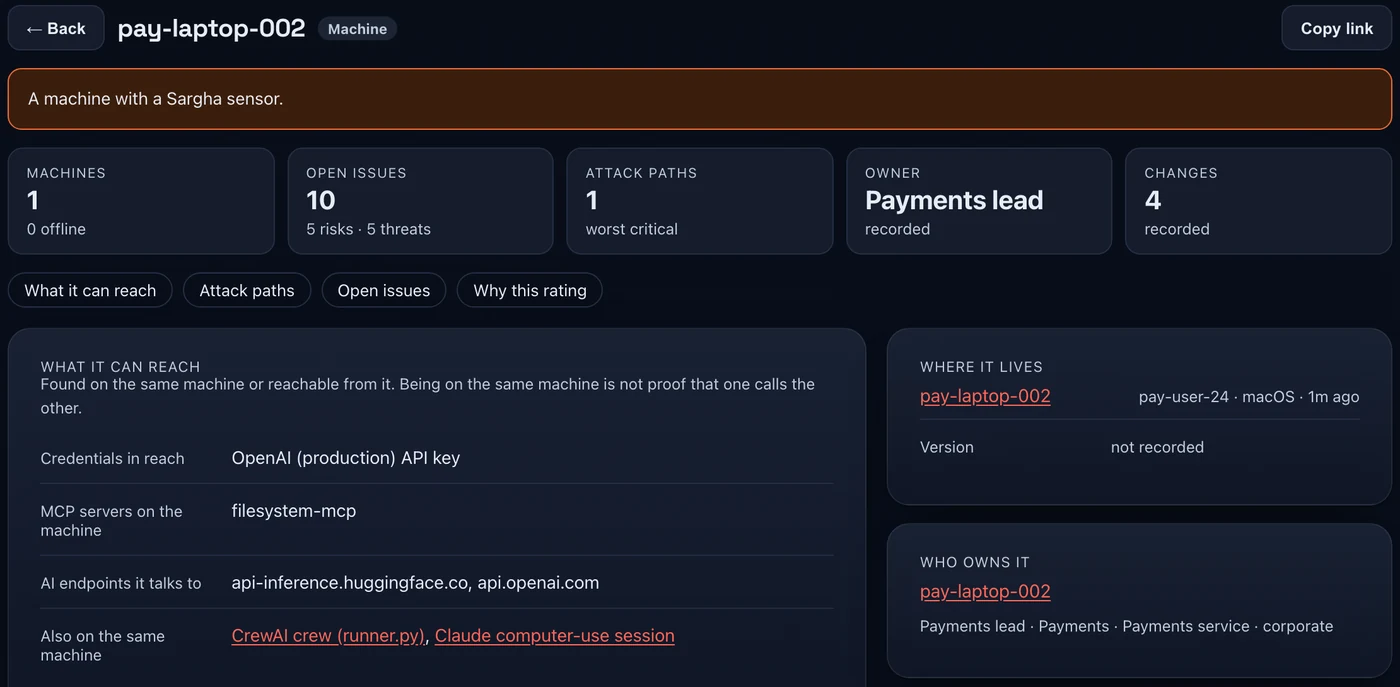
Where it lives
The machine and account it runs under, when it was last seen, and what the sensor recorded about it. What is not recorded says so instead of being guessed.
Who owns it
The owner, team, service and environment from your asset-owner records, so a finding always has someone to go to.
What it can reach, named
The credentials, tool servers and AI endpoints on the same machine, and the cloud resources it can reach. Being on the same machine is not proof that one calls the other, and the page says so.
Proven or only evidenced
Each attack path shows how far it is proven. Paths are reasoned from observed evidence. Nothing is exploited.
Decisions with an end date
Accept, mark as a false alarm or override, each with a reason, an owner and an expiry. History is kept and every decision is in the audit log.
A fix you can review
Fix as code turns the finding into artifacts built from this asset's own facts. Nothing is applied for you: you read it and run it through your own pipeline.
Details the sensor has not recorded read not recorded. Connector-reported assets have no machine path. Sargha observes by default: it records and recommends, and blocking on a machine is a separate opt-in mode.
Step by step.
Open any asset
Start from a component, a tool server, a finding or a machine. Every one opens the same page.
Read the six answers
Where it lives, who owns it, what it can reach, how it could be attacked, what changed and what was decided.
Decide, or copy the fix
Record a decision with a reason and an end date, or use Fix as code and run the result through your own pipeline.
Common questions.
What if a detail was not recorded?
Does Fix as code change anything?
- Sensors or connectors to feed the page. Recording a decision needs the triage permission (Analyst and above).
The fix-as-code samples for a web proxy and a cloud role are in the technical pack, shared with your team under NDA.
Request the demo and technical packSee the AI on your fleet in about a week.
Run the sensor across your estate and receive an AI risk report and an AI Bill of Materials. The assessment is free and carries no commitment.