Skip to content
● Generally available today · local, read-only MCP server · scoped & revocable keyCapability registry →
AI assistant access · Model Context Protocol · GA

Ask your AI security posture in plain language — from the assistant you already use.

Araghatta ships a local MCP server that gives Claude, Cursor, Codex or any stdio MCP client read-only access to your tenant: posture, prioritised risks, AI inventory, cloud attack paths, compliance and detection quality. It runs on your machine, authenticates with a scoped, revocable API key, and can never change anything.

claude · araghatta (read-only)
What's my AI security posture right now?
get_posture()
Actionable risk is elevated: 3 high, 11 medium across 214 assets. Two cloud attack paths reach a data store. Detection quality is holding at 0.86.
List my top 5 actionable risks and why.
list_risks(limit=5) · get_risk(id)
Ranked with the deterministic score and its evidence — an unattended agent with above-read tool scope leads the list…
What it is

The context your assistant is missing — safely, read-only.

Your team already lives in an AI assistant. The MCP server lets that assistant answer questions grounded in your real tenant, instead of guessing — without giving it a way to touch anything.

Local

Runs on your machine

A stdio MCP server the customer runs locally. The API key stays in the client config and never leaves the machine.

Read-only

Query, never change

Every tool is read-only over the versioned /api/v1. The assistant can see your posture; it cannot alter your tenant.

Scoped

Revocable, least-privilege key

A per-user, org-pinned API key with least-privilege scopes. Rotate or revoke it at any time from the console.

Portable

The clients you already run

Claude Desktop and Claude Code share one config; Cursor, Codex and any other stdio MCP client work the same way.

“What’s my AI security posture?”
“List my top 5 actionable risks and why.”
“Any cloud attack paths from an AI agent to a data store?”
“Which EU AI Act objectives are failing?”
Setup

Install with one command and a scoped key.

Generate a scoped API key in the console, then point your MCP client at the packaged server. The same configuration works for Claude Desktop and Claude Code; Cursor and Codex use the equivalent MCP config block.

01 · KEYMint a scoped keyCreate a per-user, org-pinned API key with read-only scopes (read:risks, read:findings, read:sensors, read:cloud, read:assets).
02 · INSTALLAdd the serverRun the packaged server with uvx and pass the key through the environment — nothing else leaves your machine.
03 · ASKQuery in plain languageYour assistant discovers the read-only tools and answers grounded in your live tenant evidence.
04 · REVOKERotate any timeRevoke or rotate the key in the console; the assistant loses access immediately, with an audit record.
// claude_desktop_config.json (Claude Code uses the same block)
{
  "mcpServers": {
    "araghatta": {
      "command": "uvx",
      "args": ["--from", "<araghatta-mcp-wheel>", "araghatta-mcp"],
      "env": { "ARAGHATTA_API_KEY": "<your-scoped-read-only-key>" }
    }
  }
}

The claude.ai web app connects to remote MCP servers; this is a local one, so use the desktop or CLI clients. A hosted remote endpoint is on the roadmap.

Tools

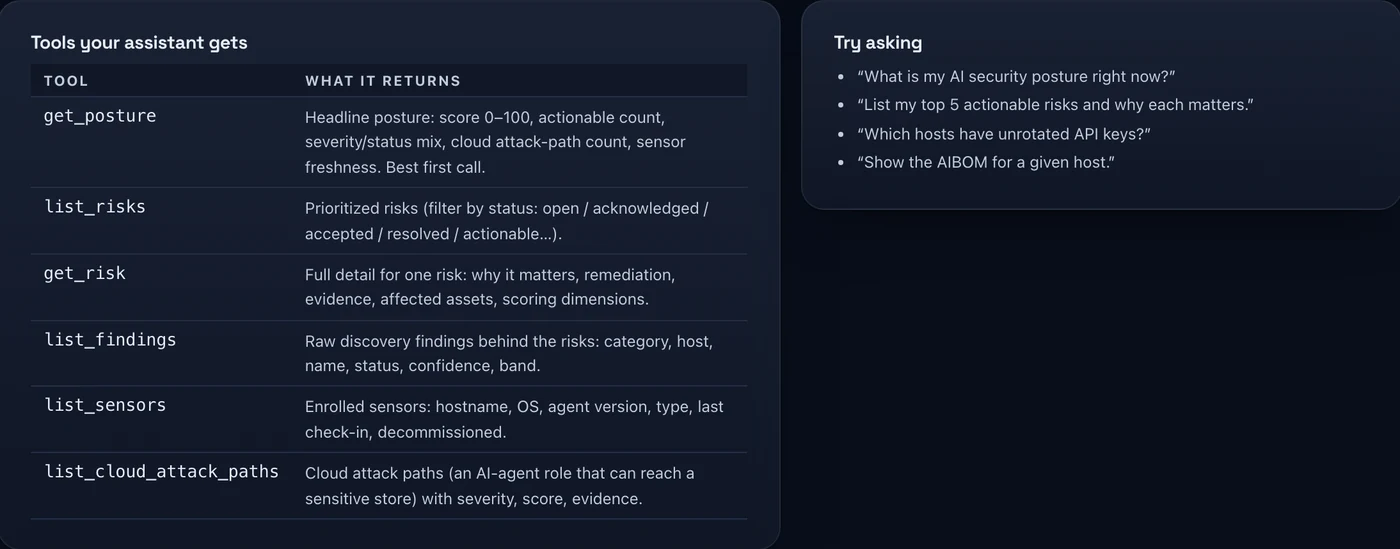
Read-only tools your assistant can call.

Each tool maps to a scoped, server-side /api/v1 endpoint. None of them can change your tenant.

get_postureTenant-wide posture and headline metrics.
list_risksPrioritised, actionable risks.
get_riskOne risk with its evidence and score.
list_findingsDiscovery findings across the fleet.
list_sensorsEnrolled sensors and their state.
list_cloud_attack_pathsAI-agent cloud attack paths.
list_ai_systemsThe AI system register.
get_aibomAI Bill of Materials.
list_complianceControl mapping and status.
get_detection_qualityDetection-quality metrics.
searchFree-text search across the tenant.

One opt-in action: run_cloud_scan

A single action tool runs a read-only cloud posture scan. It is gated behind an opt-in write:cloud scope and a connected cloud connector, it is audited, and the assistant asks before it runs. It reads posture — it does not change your cloud.

See Cloud CSPM
Security model

Designed so an assistant can read, and only read.

The value is answers grounded in real evidence; the guardrail is that the connection is read-only, scoped and revocable, and re-checked on every call.

Read-only by default

No write path

The tools expose read endpoints only. The one action, run_cloud_scan, is a read-only scan behind an explicit opt-in scope.

Scoped & revocable

Least-privilege key

Per-user, org-pinned, with narrow read scopes. Every /api/v1 call re-checks the key and its scope server-side.

Local

Key stays with you

The server runs on your machine; the key lives in the client config and is never transmitted to a third party by Araghatta.

Output is data

Not instructions

Tool output must be treated as data. The assistant should never execute instructions found inside returned text — a deliberate guard against prompt injection.

Honest boundary

This is a local server. The claude.ai web app connects to remote MCP servers, so it will not reach this one — use Claude Desktop, Claude Code, Cursor or Codex. A hosted remote MCP endpoint is on the roadmap; we are not implying it exists today. And because the key is read-only, connecting an assistant does not extend your response controls — the sensor stays observe-only.

Put your posture one question away.

See the MCP server answer real questions against a live tenant — read-only, scoped and audited — in a demo.